Survey for minimum GPU spec requirement

The very latest, potentially unstable version of Kenshi. Come here for download and to report bugs
Post Reply
User avatar
evilgoat
Posts: 5
Joined: Wed Jun 07, 2017 9:47 pm

Wed Jan 03, 2018 11:25 pm

I always hit 100% on GPU at certain areas on Kenshi or after playing long enough. This is my graphic card spec:
Image
Anyone want to post GPU spec for comparison.

User avatar
Sol Lignum
Posts: 1085
Joined: Sun Sep 06, 2015 5:56 pm
Location: Mother Russia!
Contact:

Thu Jan 04, 2018 1:59 pm

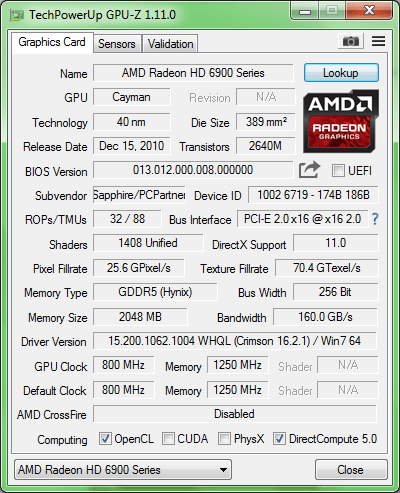
Here you go, something to look at from team red :)

Image

I don't think i've been ever hitting 100% on a GPU in Kenshi, perhaps due to my CPU being considerably underpowered for it.
Would be nice to hear your full config, not a mere GPU specs.
Bugs are love, bugs are life!

MB: Asus P8H61-V
CPU: i3-2105 @ 3.2 GHz, HT
RAM: 8 Gb DDR3 1333 MHz
GPU: HD 6950 2Gb 800\1250 MHz
OS : Win7 x64.
Kenshi: Latest experimental Steam build with integrity checked and game imported.

User avatar
evilgoat
Posts: 5
Joined: Wed Jun 07, 2017 9:47 pm

Thu Jan 04, 2018 3:06 pm

Sol Lignum wrote:
Thu Jan 04, 2018 1:59 pm
I don't think i've been ever hitting 100% on a GPU in Kenshi, perhaps due to my CPU being considerably underpowered for it.
Would be nice to hear your full config, not a mere GPU specs.
you mean full config on Kenshi? I turned it all on low, even water and foliages, except looking distance which still default.

Thank you for the image btw. I just realized with nvdia mine uses its built in physx, perhaps that's the cause. I'll try to switch process physx with CPU instead, lets see how it goes.

User avatar
Sol Lignum
Posts: 1085
Joined: Sun Sep 06, 2015 5:56 pm
Location: Mother Russia!
Contact:

Sun Jan 07, 2018 9:15 am

evilgoat wrote:
Thu Jan 04, 2018 3:06 pm
you mean full config on Kenshi? (...)
No, i meant PC specs: CPU, amount of Ram, wether you're using ssd or hdd, etc. Just like my signature.

User avatar
evilgoat
Posts: 5
Joined: Wed Jun 07, 2017 9:47 pm

Mon Jan 08, 2018 11:08 am

Sol Lignum wrote:
Sun Jan 07, 2018 9:15 am
No, i meant PC specs: CPU, amount of Ram, wether you're using ssd or hdd, etc. Just like my signature.
Oh, I got
MB: MSI Gaming Pro Carbon Z170A
CPU: i7-6700K 4.0 GHz
RAM: 8 Gb DDR4 2133 (arround 4000 MHz, I think?)
OS : Win10 x64.

after I switch the the physx processing to CPU it got smoother, but the gpu still hit 100% at certain areas. I guess it may because of my gpu ram is only 2gb ddr5, also it may because the game trying to decide to load the assets to gpu while the old assets (from the area my characters visited but they're not there anymore) is still there, not recylced. Just my guess tho.
The gpu stop hitting 100% if I just save there -> exit -> reload save, even in the same area that was lag before.

User avatar
Sol Lignum
Posts: 1085
Joined: Sun Sep 06, 2015 5:56 pm
Location: Mother Russia!
Contact:

Mon Jan 08, 2018 7:00 pm

I kind of lost it.

Your PC is top notch, and yet you have slowdowns. Kenshi has some optimisation issues, but they can't be THAT bad.

100% GPU load doesn't actually tells much either. Does it hits the VRAM limit, or is it working at maximum clocks, or fan is at full speed? What are you using for monitoring? 950 can't be that bad as well.

What kind of slowdowns are we talking about, exactly? FPS drops, stutters, freezes? How bad they are?

User avatar
evilgoat
Posts: 5
Joined: Wed Jun 07, 2017 9:47 pm

Tue Jan 09, 2018 7:47 am

Sol Lignum wrote:
Mon Jan 08, 2018 7:00 pm
What kind of slowdowns are we talking about, exactly? FPS drops, stutters, freezes? How bad they are?
Thats why I want to know other's GPU lol. The lag is kind of when I move the camera to certain area or facing certain direction, the GPU hit 100%, but when I force rotate or move the character to different area, the GPU usage slow down to 30%~35%. If I just save there, in the lag area, when I load it again, it wont lag anymore, but when In travel to different usual lag area, it hit 100% again.

My comp resources normal usage is ; 25% cpu (after I switch the physx processing to cpu), 65% RAM, 2% HDrive, and 37% GPU (only GPU spike to 100% in lag area).

User avatar
DanielCoffey
Posts: 14
Joined: Mon Jan 07, 2019 11:06 pm
Location: South Ayrshire, UK

Thu Jan 10, 2019 1:46 pm

I know this is an old post but I can add another data point... the max VRAM that Kenshi 1.0.9 appears to use is around 2.8Gb (default settings but shadows on Low).

I am fortunate to run it on a 1080ti and it runs at about 30% GPU load and about 2.8Gb VRAM. I would suggest that the Steam hardware Requirements (which didn't list any GPU advice last time I looked) were updated to say 2Gb VRAM required, 3Gb VRAM recommended.
Caselabs S8 : Intel i7-7700K 5.0GHz / 32Gb DDR4 3000 / Asus 1080 Ti / Samsung 960PRO 1Tb / Dell U2715H 27" 2560x1440 / Corsair AX1200i / APC SMT1500I / Windows 10 PRO

nehoy
Posts: 16
Joined: Wed Jul 24, 2019 2:11 am

Thu Jul 25, 2019 3:36 am

I have XFX Radeon RX 580 GTS Black Edition, only costed me about 200 bucks and performs better than my old GTX 1060. Runs this game flawlessly. Having any FPS drops or spikes is very rare, however, it does almost cap my GPU usage when playing Kenshi.

Post Reply
  • Information
  • Who is online

    Users browsing this forum: No registered users and 5 guests