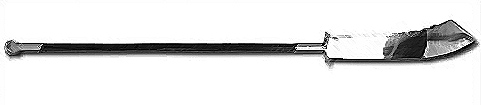
[MOD][0.74.25] Naginata

User avatar
Butta
Contributor
Posts: 313
Joined: Tue Apr 02, 2013 9:04 pm
Location: Germany

Fri Jan 09, 2015 7:50 pm

Comrey wrote:I see. Never heard of any of those except for GIMP before. Might try it out, but knowing myself I'll probably just frustrate myself into oblivion and end up using the super-rusty katana texture as a substitute for wood instead. I mean, it's brown, right? Riiight?
If you are already a bit skilled with Photoshop - stick to it. You won't have fun trying to switch to GIMP. :D
Using the super rusty texture actually seems like a good idea. Worth a try :P
Last edited by Butta on Sat Jan 10, 2015 3:08 am, edited 1 time in total.

Comrey
Posts: 13
Joined: Wed Jan 07, 2015 1:00 am

Fri Jan 09, 2015 11:53 pm

Butta wrote:If you are already a bit skilled with Photoshop - stick to it. You won't have fun trying to switch to GIMP. :D
Using the super rusty texture actually seems like a good idea. Worth a try :P
I've heard GIMP was a pain to get in to, so I guess I'll stick with PS as you said. Do you know a way of removing the weapon scabbard by the way? I doubt a rusty blade would go for a wooden one if it would be sheathed into an equally rusty scabbard, lol. Is it as easy as deleted the scabbard mesh associated with the weapon in the files? Oh, and Is Blender hard to get into? I've got a few weapons I'd love to see in-game, like a Bō for example.

User avatar
Butta
Contributor
Posts: 313
Joined: Tue Apr 02, 2013 9:04 pm
Location: Germany

Sat Jan 10, 2015 3:08 am

Comrey wrote:
Butta wrote:If you are already a bit skilled with Photoshop - stick to it. You won't have fun trying to switch to GIMP. :D
Using the super rusty texture actually seems like a good idea. Worth a try :P
I've heard GIMP was a pain to get in to, so I guess I'll stick with PS as you said. Do you know a way of removing the weapon scabbard by the way? I doubt a rusty blade would go for a wooden one if it would be sheathed into an equally rusty scabbard, lol. Is it as easy as deleted the scabbard mesh associated with the weapon in the files? Oh, and Is Blender hard to get into? I've got a few weapons I'd love to see in-game, like a Bō for example.
How did I manage to write inside the quote?! :D Anyways, fixed it.

You mean deleting the mesh file itself? Hell no! Just remove the sheath path and you won't see it anymore. And regarding your Blender question: Well.. the first time you start the program you will probably think "what the ..." but after a few tutorials and as soon as you know how to extrude, it will be really nice to work with. A Bō should be really easy to create. I actually had a Kanabō ready to mod in, but I managed to mess up UV maps and my texture. I didn't feel like fixing it yet. :D

Comrey
Posts: 13
Joined: Wed Jan 07, 2015 1:00 am

Sat Jan 10, 2015 1:20 pm

Butta wrote: You mean deleting the mesh file itself? Hell no! Just remove the sheath path and you won't see it anymore. And regarding your Blender question: Well.. the first time you start the program you will probably think "what the ..." but after a few tutorials and as soon as you know how to extrude, it will be really nice to work with. A Bō should be really easy to create. I actually had a Kanabō ready to mod in, but I managed to mess up UV maps and my texture. I didn't feel like fixing it yet. :D
Ah I see. A Kanabō would be pretty cool, though I'd go for a regular Bō instead. There's something about a stick being lethal in the hands of a master that makes it so overly simplistic yet fascinating at the same time. That and since it's Kenshi, one could always make a stronger yet heavier Bō out of steel just for shits and giggles. When I make squads to play with I usually go for a pretty number (like 7 or something) of very strong warriors that all are a bit different from one another, most commonly weapon used. This is why weapon variety is important to me, haha.

Anyway, should probably stop going offtopic here in this mod thread. Thanks for your help with the explanations and everything!

NeoCat
Posts: 48
Joined: Mon Oct 27, 2014 5:55 am

Tue Jan 27, 2015 9:27 pm

Tested this one and its still working in 71.3 though the item icon is still missing.

User avatar
Butta
Contributor
Posts: 313
Joined: Tue Apr 02, 2013 9:04 pm
Location: Germany

Tue Jan 27, 2015 11:16 pm

NeoCat wrote:Tested this one and its still working in 71.3 though the item icon is still missing.
Thanks for letting me know! To fix the icon you have to delete the already generated icon (the one that is messed up) and the game will generate a new one that should look correct.
\Kenshi\data\icons
Since there are tons of icons: I think it should be the last icon in the folder and it may be called "5006.5008.5007.png"

NeoCat
Posts: 48
Joined: Mon Oct 27, 2014 5:55 am

Wed Jan 28, 2015 12:04 am

Unless I skipped a step it just regenerates the same black icon.

User avatar
Butta
Contributor
Posts: 313
Joined: Tue Apr 02, 2013 9:04 pm
Location: Germany

Wed Jan 28, 2015 4:32 pm

NeoCat wrote:Unless I skipped a step it just regenerates the same black icon.
Then you are using the 0.67.2 (0.69.2) version I guess? It should be fixed if you download the latest version for the experimental. There are a few differences between both, see my update post:
http://www.lofigames.com/phpBB3/viewtop ... 132#p41751

NeoCat
Posts: 48
Joined: Mon Oct 27, 2014 5:55 am

Wed Jan 28, 2015 7:56 pm

Butta wrote: Then you are using the 0.67.2 (0.69.2) version I guess? It should be fixed if you download the latest version for the experimental. There are a few differences between both, see my update post:
http://www.lofigames.com/phpBB3/viewtop ... 132#p41751
Just checekd my downloads folder, i did get the 70.3 version.

Also this might not be a problem you can fix directly but the silver version on nexus mods just loads a blank page and doesn't start any download.

Hmm none of the nexus download links seem to be working for me.

User avatar
Butta
Contributor
Posts: 313
Joined: Tue Apr 02, 2013 9:04 pm
Location: Germany

Thu Jan 29, 2015 4:52 pm

I have a week off soon so I will update all my mods properly.

Also I can't download something from the Nexus either.. strange.

User avatar
Deathhood98
Posts: 54
Joined: Thu Jan 03, 2013 6:35 pm

Sun Feb 01, 2015 5:29 am

How did you get it into .mesh format i have been looking for a .mesh importer and exporter for a while but all the links i find are down

User avatar
Butta
Contributor
Posts: 313
Joined: Tue Apr 02, 2013 9:04 pm
Location: Germany

Sun Feb 01, 2015 1:26 pm

Deathhood98 wrote:How did you get it into .mesh format i have been looking for a .mesh importer and exporter for a while but all the links i find are down
I created the mesh from scratch and then exported with this one:
https://code.google.com/p/blender2ogre/

User avatar
BoogieMan
Posts: 69
Joined: Mon May 06, 2013 9:31 pm

Wed Feb 18, 2015 5:55 pm

What skill does this weapon use?

User avatar
Butta
Contributor
Posts: 313
Joined: Tue Apr 02, 2013 9:04 pm
Location: Germany

Wed Feb 18, 2015 7:12 pm

BoogieMan wrote:What skill does this weapon use?
Katana. I thought it fits best :P

User avatar
BoogieMan
Posts: 69
Joined: Mon May 06, 2013 9:31 pm

Sat Feb 21, 2015 4:36 am

Butta wrote:
BoogieMan wrote:What skill does this weapon use?
Katana. I thought it fits best :P
I figured it probably did, I just wanted to be sure. Thanks! Look forward to finding one.

MidnightCoffee
Posts: 3
Joined: Tue Jul 14, 2015 3:13 am

Tue Jul 14, 2015 3:16 am

Is this updated for the latest version of Kenshi? Don't wanna bother installing it and spend hours searching for the guys only to find it's not working.

User avatar
Butta
Contributor
Posts: 313
Joined: Tue Apr 02, 2013 9:04 pm
Location: Germany

Tue Jul 14, 2015 11:33 pm

15/7/2015
- Updated to Kenshi 0.74.25
- Fixed Inventory Icon (Really this time!)
- Gold and Silver version are now both included and the game will randomly choose between them (not on the Lofigames forum because the maximum upload size is 2mb)

Image
Maybe I overlooked something, but I couldn't change the angle. It still turned out quite well I guess.

I also wanted to take a look at the clipping issues, but.. I somehow managed to delete my original Naginata .blend and now I can't edit the mesh. That means the next "bigger" update will contain a new (and hopefully better) mesh with better textures. BUT this will take a while since I just moved to Berlin and time got a bit spare!

ScarabParamit
Posts: 46
Joined: Tue Mar 04, 2014 12:01 am

Mon Nov 16, 2015 8:55 pm

I work on large mod, one of plugin is weapons overhaul and addon ...thing is ...i menaged to make 20 just by playing with scale and scale of ingame models, but don't have any 3D knowleadge, so mostly its polished balance wise, with somewhat working icons.
Do i have Your aproval to use this model and add you into credits? ...its a "must have" in my point of view.

Regards.

User avatar
Butta
Contributor
Posts: 313
Joined: Tue Apr 02, 2013 9:04 pm
Location: Germany

Tue Nov 17, 2015 8:44 pm

ScarabParamit wrote:I work on large mod, one of plugin is weapons overhaul and addon ...thing is ...i menaged to make 20 just by playing with scale and scale of ingame models, but don't have any 3D knowleadge, so mostly its polished balance wise, with somewhat working icons.
Do i have Your aproval to use this model and add you into credits? ...its a "must have" in my point of view.

Regards.
Hey there! Thanks for the kind words.
It would be really cool if you could make it in a way, that people still have to download my mod from here for the textures and meshes! That would be awesome of you. Other than that you have my permission to include the Naginate in your mod as long as you give credits. :)

ScarabParamit
Posts: 46
Joined: Tue Mar 04, 2014 12:01 am

Fri Nov 20, 2015 9:31 pm

Butta wrote:
ScarabParamit wrote:I work on large mod, one of plugin is weapons overhaul and addon ...thing is ...i menaged to make 20 just by playing with scale and scale of ingame models, but don't have any 3D knowleadge, so mostly its polished balance wise, with somewhat working icons.
Do i have Your aproval to use this model and add you into credits? ...its a "must have" in my point of view.

Regards.
Hey there! Thanks for the kind words.
It would be really cool if you could make it in a way, that people still have to download my mod from here for the textures and meshes! That would be awesome of you. Other than that you have my permission to include the Naginate in your mod as long as you give credits. :)
I understand they rise up Your statistics?...or something?

I can do this with Your mesh...little problem as i sit in mods for years and hate when they just die do to old links and like always to make packs "that just works" ...you understand? This would brake this mods survive-ability...or force me to made ver. without it. Just say is it REALY neccesary ?
As for textures, i didn't find Naginata_s = silver ver. ...i did remade Naginata_g so now there is proper gold, silver and bronze...so tex will be provided.

Regards and thank You.

P.S. If anyone is interested from last two days experiments...yesterday i menaged to finnaly made vertically stabilized buildings (always ideally pointing sky) and opposite sloped so we will be able to place for example wind generators on mountains walls with 80* and all buildings like Outpost will have additional stabilized type (in their choosing sub-menu) called "v-..." (like vertical when basics ware "s-..." that nicley fit as a slope) to be build nicley straight and elevated properly...so we will be able to choose do we like to build immersive deformed city or more properly enginnered military-newage-tech kida way like today standards. All alredy build bases ant tech is supported ;-)
Anyone know how to scale up bildings like we can weapons? There are to values but none of them works =(
As for today i remade whole lights tech and their kidns...a ton in different colours from iluminating to guide beacons, white yeallow red and blue, lamps lost and from upcoming updates etc. Street lights, poles, lamps, indoor torches (you start with research of torches on poles and indoor torches before electrical lighting for immersion purposes) and wall light etc. ...i also enabled Ceiling Fan to be build ;-P as switch wind generator blueprint with generators tech and other way around...immersion and balance all the way.
A lot of balance, bug fixes and upgrade researches (like upgraded generators I did not upgrade generator II III or IV but only I when upgraded generators II upgraded all and based upon description that is not hav our beloved dev wanted this to work) , ...what i did to turrets i will keep in secret but you will love them...8 completly diffirent types and no redundants - all will have their rolles to late-game! Ha ha...thats just a little drop in a sea but this is not a topic about it but Butta's Naginata so i will shout up. Sorry, it was hard to resist sharing something xD

Once more thank you for permission, stay tuned for credits...and tell me do You know anyone who could made:
Guan Dao - http://www.globalgear.com.au/media/cata ... c_0633.jpg
Woldo - https://walakanet.files.wordpress.com/2 ... woldo2.jpg

Post Reply
  • Information
  • Who is online

    Users browsing this forum: No registered users and 12 guests